

Amazon FBA Stockouts: The Ranking Cost and How to Prevent Them
Running out of stock on Amazon triggers a chain reaction that starts with your Best Seller Rank (BSR) and ends with your bank account. A two-week stockout on a product selling 15 units per day at $40 ASP costs roughly $10,000 or more when you add up lost revenue, PPC recovery spend, and the compounding effect on organic ranking. Short stockouts on established products can recover in a week. Extended ones can set you back months.
The standard advice is to forecast better and set tighter reorder points. That advice is fine, but it misses the structural problem: many Amazon FBA stockouts are capital planning failures where the seller knew when to reorder but couldn't afford to.
This post covers what a stockout actually costs, how long recovery takes at different durations, and the capital planning framework that prevents stockouts from happening in the first place.
What Happens When You Go Out of Stock on Amazon?
When your inventory hits zero, several things happen in rapid sequence:
- Sales velocity drops to zero. Amazon's BSR is a velocity-based signal. No sales means immediate rank decay.
- Buy Box is lost. If other sellers offer the same product, they take the Buy Box. If you're the only seller, the listing shows as unavailable.
- Organic keyword rankings decay within 48 to 72 hours. Amazon's search algorithm rewards consistent sales velocity. A sudden stop sends your keywords sliding.
- PPC campaigns auto-pause. No inventory means no impressions. Your ad spend stops, but so does the ranking signal it was generating.
- Your listing may go Inactive (Out of Stock). It's not suppressed in the technical sense, but it's invisible to shoppers.
- Amazon's low-inventory-level fee kicks in before you hit zero. Once you drop below 28 days of supply, the fee applies at $0.09 to $0.70 per unit. You start paying a penalty before the stockout even begins.
- Competitors capture your customers. Research suggests 69% of shoppers will buy an alternative product when their first choice is unavailable.
- Hijacker risk increases. Other sellers may jump on your listing with counterfeit or defective product. One seller in the Amazon forums reported approximately 30 one-star reviews accumulated during a single stockout from a hijacker selling defective units.
BSR recovery and keyword ranking recovery are not the same thing. A seller in the Amazon EU forums reported recovering their BSR after a three-month stockout through aggressive PPC, reaching a BSR comparable to their pre-stockout level. But they had zero organic visibility. They couldn't be found in the first seven pages of search results for their main keywords. BSR came back because they were paying for sales. Organic ranking had not recovered at all.
This distinction matters because it changes the true cost calculation. You can buy back your BSR with PPC. Organic keyword ranking recovery takes longer and costs more.
How Much Does an Amazon FBA Stockout Actually Cost?
Most sellers know stockouts are expensive. Few calculate the actual number. Trellis surveyed 240 sellers and found an average cost of $18,000 per stockout event. But averages obscure the range. The cost of your stockout depends on your product's velocity, margin, and how long you're out.
Total Stockout Cost = Direct Revenue Loss + PPC Recovery Cost + Low-Inventory-Fee Cost + Ranking Recovery Opportunity Cost
Here's what that looks like for a 14-day stockout on a moderate-velocity product:
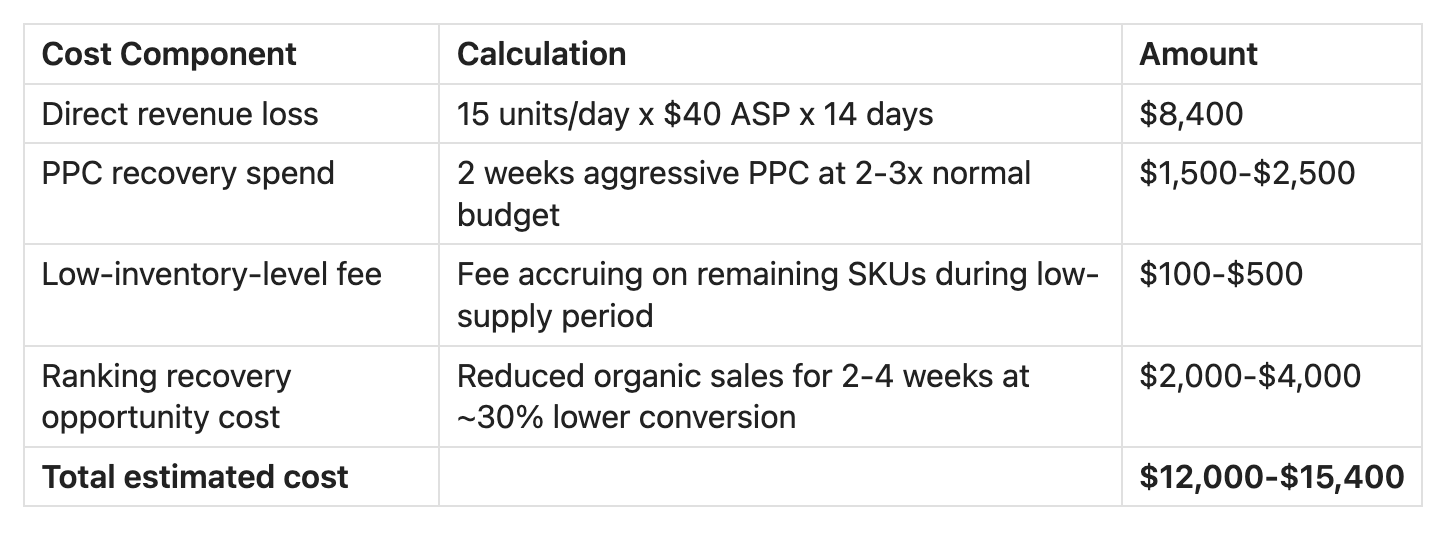
And that's just for a single product, two weeks out of stock. Take a multi-ASIN portfolio running out of stock across several products and the cost compounds quickly.
The formula above lets you plug in your own numbers. Adjust the daily velocity, ASP, and stockout duration to see what a stockout actually costs your specific business.
How Long Does It Take to Recover Amazon Ranking After a Stockout?
This is the most asked and worst answered question in the Amazon seller space. The common response is "2 to 4 weeks" but that answer is vague to the point of being unhelpful because it doesn't account for how long you were out.
Recovery time scales with stockout duration, and the relationship is not linear. A 3-day stockout and a 30-day stockout are fundamentally different recovery problems.

Three variables determine where you fall within these ranges:
- Product maturity. Established products with strong review profiles and long sales histories are likely to recover faster than newer products.
- Category competitiveness. In saturated categories, competitors absorb your sales and ranking positions quickly. In niche categories, positions may still be open when you return.
- Recovery investment. How aggressively you spend on PPC and promotions after restocking directly affects recovery speed. Treating a restock like a passive event, just turning listings back on, extends recovery dramatically.
Why sellers get conflicting advice about stockout damage
You may have seen contradictory claims about how much stockouts hurt ranking. There's a reason for that.
EcomCrew published a case study tracking 5 ASINs through stockout events and found minimal long-term ranking impact, with recovery within about 4 weeks. That study gets cited frequently as evidence that stockouts aren't that bad.
But the seller community tells a different story. Threads in the Amazon forums are full of sellers reporting months-long recovery timelines after extended stockouts, especially on newer products in competitive categories. The pattern in the data is consistent: longer stockouts cause disproportionately worse ranking damage, and recovery depends heavily on product maturity and category competition.
The difference comes down to context. Short stockouts on established products with deep review profiles in less competitive categories probably do recover quickly, consistent with EcomCrew's findings. Extended stockouts on newer products in competitive categories can be devastating.
Recovery speed depends on three things: how long you were out, how established your product is, and how aggressively you invest in recovery. Blanket statements about stockout impact ignore these variables.
Why Many Amazon FBA Stockouts Are Actually a Capital Planning Failure
Every article on preventing Amazon stockouts says the same thing: forecast demand, set reorder points, maintain safety stock. That's all correct, but it skips the step where most stockouts actually happen.
The reorder point formula tells you when to reorder:
Reorder Point = (Average Daily Sales x Total Lead Time) + Safety Stock
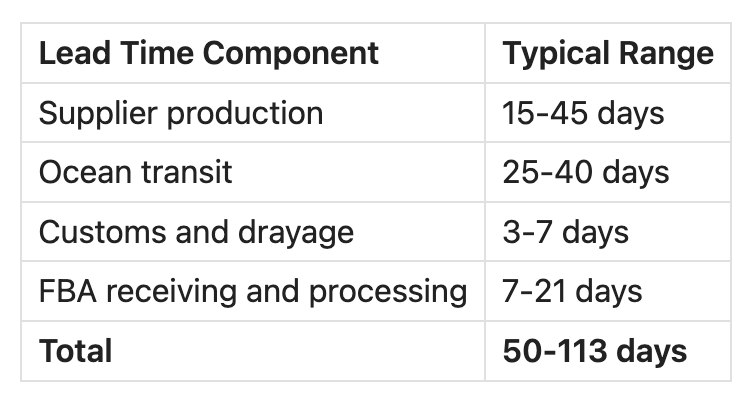
The formula is straightforward, but placing the order means paying your supplier. For many FBA sellers with overseas sourcing, total lead time from order placement to FBA-ready inventory is 50 to 113 days:
Your supplier deposit is due at order placement. The remaining balance is due at shipment. But the revenue from your current inventory is still working through Amazon's disbursement cycle, which takes 21 to 35 days to reach your bank account after a sale, longer since the March 2026 DD+7 policy.
The gap between "when you need to pay your supplier" and "when Amazon pays you" is the structural cause of many stockouts. You pay suppliers 30 to 60 days before the revenue from prior inventory arrives. If the cash isn't there when the reorder trigger hits, you delay. If you delay past the lead time window, you stock out. It's not a forecasting failure. It's a cash deployment timing problem.
This plays out in seller communities every day. One seller in the Amazon forums described doing $1,200 per day in sales with 50% COGS. They couldn't fund production while Amazon held their money for 15-plus days. Their solution was putting their store on "vacation mode" when sales increased, deliberately throttling growth because the cash couldn't keep pace. "Every time sales start to increase, I have to put my store on vacation mode to catch up with money."
These sellers know their reorder point and lead times, but utimately can't afford to act on that knowledge when the trigger hits.
How DD+7 makes the capital planning problem worse
Amazon's DD+7 policy, effective March 12, 2026, holds seller funds for 7 additional days after confirmed delivery. For a seller doing $10,000 per day in sales, that's $70,000 in additional cash locked in Amazon's system at all times.
DD+7 doesn't just slow down your cash flow, it also directly reduces the cash available for your next reorder. A minor payout delay creates a capital gap that cascades forward: you delay the reorder by a week, the shipment arrives a week late, and the gap between when current inventory runs out and when new inventory arrives grows wider.
For the full breakdown of how DD+7 works, see Amazon's DD+7 Payout Policy: What It Means for Your Cash Flow.
How to Build a Stockout Prevention System
Prevention starts with knowing two numbers: when you need to reorder and whether you can afford to reorder at that moment.
Step 1: Calculate your true total lead time. The full timeline from order placement to inventory available for sale in FBA. Include production, ocean transit, customs, last-mile delivery to FBA, and Amazon's receiving process. For most overseas-sourced products, this is 50 to 113 days.
Step 2: Calculate your reorder point. (Average daily sales x total lead time) + safety stock. Safety stock is typically 10 to 14 days of average daily sales for stable products, higher for products with variable demand.
Step 3: Set a capital allocation trigger. When inventory hits the reorder point, the capital for that order must already be readily available. If arranging financing takes 5 to 10 days, your capital trigger needs to fire 5 to 10 days before the reorder point.
Step 4: Build a rolling cash flow forecast. A 13-week cash flow forecast shows you exactly when capital gaps will occur, weeks before they arrive. The forecast maps your reorder dates against your expected Amazon disbursements and tells you whether cash will be there when you need it.
Step 5: Monitor the low-inventory-level fee threshold. Amazon's low-inventory-level fee kicks in at 28 days of supply. Use this as an early warning. If you're approaching 28 days and your reorder hasn't shipped, you're already paying a penalty and the stockout is getting closer.
Slope's Amazon Line of Credit
For Amazon sellers who receive an offer through Seller Central, Slope's revolving line of credit* is available directly in the Amazon Lending portal. Revolving lines up to $5M, APRs as low as 8.99%, subject to credit approval and eligibility requirements. Supported by a J.P. Morgan credit facility, originated by Lead Bank, Member FDIC.
Each draw carries a fixed repayment schedule you set at the time of the draw — repayment does not accelerate based on revenue volume. As draws are repaid, the line replenishes for the next inventory cycle. The application uses a soft credit pull and does not affect your personal credit score. No personal guaranty required.
Check your eligibility in the Amazon Lending portal in Seller Central.
*Slope is a financial technology company, not a bank. Business-purpose loans made by Lead Bank and subject to credit approval. Application and consent to obtain personal credit report is required. Subject to minimum revenue and business requirements. Fees vary based on risk assessment and loan term.
Frequently Asked Questions
What happens when you go out of stock on Amazon FBA?
Your BSR drops immediately as sales velocity goes to zero. Organic keyword rankings begin decaying within 48 to 72 hours. Your Buy Box is lost, PPC campaigns auto-pause, and the listing may go Inactive. Competitors capture your customers, and if your listing is unprotected, hijackers may jump on it with counterfeit product. Amazon's low-inventory-level fee applies before you even reach zero, starting at 28 days of supply.
How long does it take to recover Amazon ranking after a stockout?
Recovery time depends on stockout duration. A 1 to 3 day stockout typically recovers in 3 to 7 days. A 4 to 10 day stockout takes 2 to 4 weeks with increased PPC. A 10 to 30 day stockout requires 4 to 8 weeks and a full relaunch strategy. Stockouts lasting 30 or more days can take 2 to 6 months to recover and should be treated as a new product launch.
How much does a stockout cost an Amazon seller?
The total cost includes direct revenue loss, PPC recovery spend, low-inventory-level fees, and ranking recovery opportunity cost. For a product selling 15 units per day at $40 ASP, a two-week stockout costs approximately $12,000 to $15,000. The industry average across 240 sellers surveyed by Trellis was $18,000 per stockout event.
Is it better to raise prices or go out of stock on Amazon?
The current consensus favors a staged approach: first reduce PPC to slow sell-through, then raise prices gradually in small increments, monitoring Buy Box status throughout. Fully stocking out risks listing hijacking, ranking damage, and competitor gains. But drastic price increases can trigger Amazon's pricing algorithm and lose the Buy Box. The least-bad path is a controlled slowdown.
What is the reorder point formula for Amazon FBA?
Reorder Point = (Average Daily Sales x Total Lead Time) + Safety Stock. Total lead time for FBA with overseas sourcing is typically 50 to 113 days, including supplier production, ocean transit, customs, and FBA receiving. Safety stock is commonly 10 to 14 days of average daily sales for stable-demand products.
Does Amazon's DD+7 payout policy increase stockout risk?
Yes. DD+7 holds seller funds 7 additional days after confirmed delivery, reducing the cash available for reorders. For a seller doing $10,000 per day, DD+7 locks $70,000 in additional capital in Amazon's system. That's cash that could have funded a reorder. The payout delay directly widens the gap between when you need to pay suppliers and when Amazon pays you.
This content is for informational and educational purposes only. It does not constitute financial, legal, or investment advice. Consult a qualified financial advisor before making any borrowing decisions.
*Slope is a financial technology company, not a bank. Business-purpose loans made by Lead Bank and subject to credit approval. Application and consent to obtain personal credit report is required. Subject to minimum revenue and business requirements. Fees vary based on risk assessment and loan term.